One PowerPoint Recommended
Just this one slide
$2.99one-time
- See a watermarked PowerPoint preview before you pay (free with Google sign-in)
- Pay only if you keep it
- One image at a time
- No monthly plan needed for one slide
For scanned, image-only and NotebookLM-exported PDFs (up to 30 pages). You get an editable .pptx to open in Google Slides, not a Slides file.
or drop images or a PDF ·
Opens in PowerPoint, Keynote & Google Slides · No charge if it fails
Uploads are deleted after 30 days and never used to train our models
Text and every icon or shape come out as native vector objects. Change the wording, drag a whole icon, recolour it in one click, zoom in without blur. These are shapes, not cut-out picture pieces.
Screen-captured edits of shapes in an exported PowerPoint. Results vary with the source image.
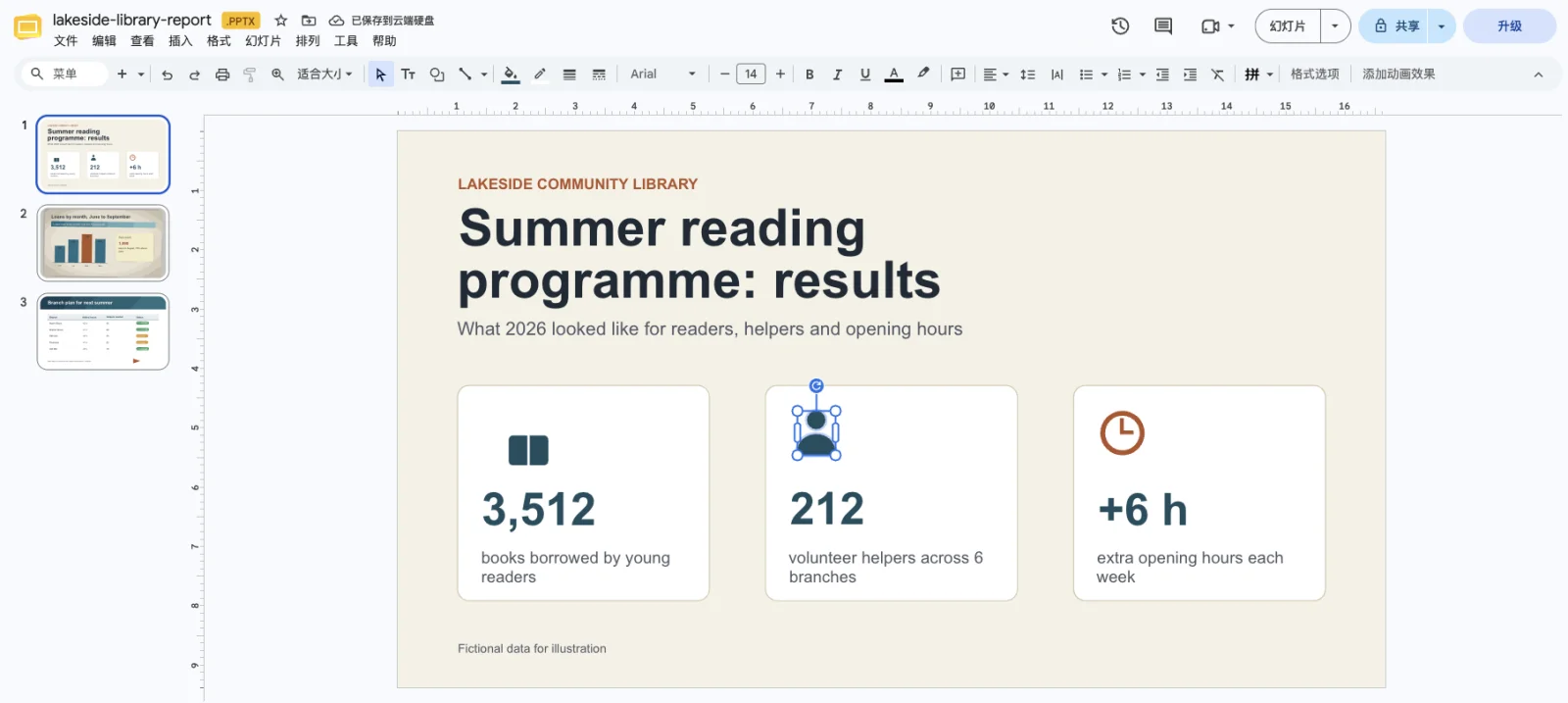
We made a three-page PDF in which every page is one picture with no selectable text: a cover with key figures, a chart page tilted and textured to imitate a scan, and a plan with a table. All names and figures are invented. Each page was converted the way the site converts the pages of your PDF, and the three results make up one .pptx, which we then uploaded to Google Drive and opened in Google Slides. Pick a page to compare it with its slide; outlines mark text boxes and shapes.
Preview rendered from the downloadable PPTX. Outlines show native PowerPoint objects.
Only one page? Save it as a PNG or JPG and upload the image instead: watermarked previews are free with Google sign-in (up to 3 a day), then $2.99 or 2 credits. A whole PDF has no preview and is charged per delivered page. Unraster is not affiliated with Google.
A PDF is 2 credits per delivered page, up to 30 pages, with no free preview. Failed pages are not charged.
Open the PDF and try to select a word. If nothing highlights, every page is a picture, as in a scan or a NotebookLM slide export, and this page is for you. If the text selects, see the FAQ below.
Drop or choose one PDF of up to 30 pages. Your browser splits it into page images and only those images are uploaded, not the PDF file. A longer PDF asks which pages to convert.
The button shows the total: 2 credits for each page, so ten pages are 20 credits. You need to be logged in with enough credits. You are charged only for pages that are delivered.
Each page takes roughly 30 to 70 seconds and two are converted at a time, so keep the tab open. Download PPTX, then upload the file to Google Drive. Unraster does not output Google Slides format and there is no one-click import.
Double-click the .pptx in Drive to open it in Google Slides. Then use File, Save as Google Slides to make a Slides copy. Click a text box to retype; an icon arrives as simple shapes, sometimes grouped, and a click may select only part of it.
Free watermarked preview with Google sign-in · failed conversions are never charged.
Just this one slide
$2.99one-time
Pay once, use any time · no subscription
$9.90one-time
Regular decks, every month
$19.90/ month
Billed monthly
Pay $2.99 once, no subscription. See the watermarked preview free with Google sign-in before you pay.
$2.99 per image, no monthly plan needed. Preview the editable result first, move text and shapes, and pay $2.99 only if you keep it. If a conversion fails, you are not charged.
Prices in USD. Optional AI Clean-up is 1 credit. Cancel or change plans anytime in Credits & billing.
Secure checkout by Stripe
Anything else? Email us.
Not in one click from Unraster. Unraster rebuilds a scanned or image-only PDF as a .pptx with text boxes and shapes. Upload that file to Google Drive, open it in Google Slides, then use File, Save as Google Slides for a Slides copy.
Probably not. Here every page is turned into a picture first and then rebuilt, so real text is read from the picture instead of copied from the file. A PDF with a text layer can be converted by free PDF-to-PowerPoint tools that read the text directly, and those usually keep fonts better. Use this page for scans, a screenshot saved as PDF, or a slide deck exported as images, such as NotebookLM slides.
Not as slides. Google Drive can open a PDF in Google Docs, and for a scan Docs may recognise some of the words as text. You get a document, though: the layout is lost and it is not one slide per page. A rebuild as a .pptx keeps each page as a slide with its text boxes and shapes.
2 credits for each delivered page, so a 10-page PDF is 20 credits and a 30-page PDF is 60. No subscription is needed, but you must be logged in with enough credits. A page that fails is not charged and can be retried on its own for 2 credits. Check the pack sizes under Pricing first.
No. A PDF has no free preview and no $2.99 single option. To try the quality first, save one page as a PNG or JPG and upload that image: the watermarked preview is free with Google sign-in (up to 3 a day), then $2.99 or 2 credits to unlock.
In our test the fonts all became Arial, gradients turned into stepped flat patches, the icons arrived as simple shapes rather than pictures, some grouped and some not, and a table was shapes and text rather than a native table. The slides kept the PDF page proportions. Check every slide against your PDF before you share it; it is a rebuild, never an exact copy.
Up to 30 pages in one run, as one .pptx with a slide per page. For a longer PDF, a dialog asks which pages to convert; run the next range as a separate conversion. This is a website feature; the API takes one image per request.
Your browser renders each page to an image, and only those page images are uploaded to our conversion service and the service providers it uses; the PDF file itself is not. The images and the result are kept on our servers for 30 days, then deleted automatically, or sooner if you delete them. They are not made public. A password-protected PDF has to be unlocked first.
No. Unraster is not affiliated with Google and has no Google Slides add-on. It outputs a standard .pptx that Google Slides can open.
Or drop images or a PDF anywhere on this page.