unraster

Best tools for images to editable PowerPoint.

For slides stuck as images or scanned PDFs, try ReDeck, Unraster or Tosea’s Reslide; PPTEase takes images only. Canva is for design.

or drop images or a PDF ·

Free watermarked preview with any account · $2.99 or 2 credits to unlock · Full pricingPricing →

Five tools, what each one is for

Prices and limits are what each tool’s own pages said on the date shown; they change, so check the tool before you pay. Statements about what a tool outputs are the tool’s own, unless the next section says we tried it.

ToolBest forEditable PowerPoint outputPrice modelLimits to know
ReDeckChecked Nov 13, 2026PDFs, screenshots and scans, including Gemini Notebook (formerly NotebookLM) exports, that you want as PowerPoint.Recognized text becomes text boxes, simple shapes can become native PowerPoint shapes and some graphics can be moved separately; charts and tables remain images.Free: 3 pages once per account (needs an account; not guaranteed, expires 30 days after sign-up). Pay as you go: $25 one time for 200 pages. Pro: $29 a month for 300 pages.Converting needs an account. Also takes BMP, GIF and TIFF images; the $25 pack is valid for 12 months. Review missed text, small labels and layout differences.
UnrasterChecked Nov 13, 2026An image of a slide, chart, flowchart, table or infographic, or an image-only PDF, that you want as editable PowerPoint.Text boxes plus separate shapes. Charts and tables come back as shapes and text, not native charts or tables.Watermarked preview free with any account (up to 3 a day); unlock one image for $2.99 or 2 credits. PDF: 2 credits a page (up to 30), no free preview. Several images: 2 credits each with a subscription, 3 without. Optional plans and packs.Needs an account for the preview. Fonts are replaced, small lettering can come back as shapes, arrows are not connectors, and the result is never an exact copy.
PPTEaseChecked Nov 13, 2026A quick free try on up to 10 slide images (PNG, JPG, WebP) without making an account. Images only: it does not take PDFs.Text boxes and simple shapes over a page picture; complex artwork stays raster. You can correct OCR text and accept or reject detected shapes before export; no PPTEase watermark; Chinese and English OCR.Free to use, no sign-up, runs in your browser. Its Pro preview mode is free while billing is not connected.Up to 10 images and 20 MB each; fonts and spacing can change.
ToseaChecked Nov 13, 2026Writing a new deck from a prompt or a document. It also has free image-to-PPT and PDF-to-PPT tools, and Reslide for larger image and PDF jobs.Tosea’s exported .pptx has editable text boxes, shapes and tables; its image tool rebuilds each image as an editable slide, and its PDF tool rebuilds PDFs that have a text layer (scans come back as images). Reslide rebuilds pages as text boxes, shapes and separate pictures.Tosea: free 200 credits a month with a watermark, Pro $9.99 a month billed yearly ($119.88 a year). Free image and PDF tools: 5 a month in total, shared between the two, with a small watermark. Reslide: 10 free pages once, then $19 a month for 300 pages.All need a login. Free image tool: up to 10 images and 10 MB each; free PDF tool: PDFs up to 30 MB. Reslide takes PDFs and PNG, JPG or WebP images, up to 100 pages per task, charges nothing for failed tasks, and results vary with source quality and complexity.
CanvaChecked Nov 13, 2026Laying out and polishing slides in Canva, then exporting them as a PowerPoint file.Grab Text turns text inside an image into editable text boxes on a design. You can place the PNG in a design and download it as a PPT.Free plan and paid plans per person; see Canva’s pricing page. Grab Text is available on eligible plans.Grab Text does not support rotated or arched text, non-Latin alphabets or multi-page files, and can miss or invent text.

Unraster makes this page and is one of the tools listed; we are not affiliated with ReDeck, PPTEase, Tosea or Canva. If a detail is out of date, email support@unraster.ai and we will check it.

The same three slides, run through Unraster.

A dashboard screenshot, a flowchart slide and an infographic with a table, all made up and saved as PNG. Each went through Unraster once and the three slides are bundled into one .pptx here. Pick one to compare the original with its slide; outlines mark text boxes and shapes.

Compare
Original image · Page 1 · Sales dashboard
PowerPoint result

Preview rendered from the downloadable PPTX. Outlines show native PowerPoint objects. Some fine lettering may remain as shapes.

What happened when we tried them

On November 13, 2026 we ran the same three made-up slides through Unraster and through PPTEase (in a browser, no account), one try per slide. The Unraster files come from the same conversion service the website uses, run by us directly, so they carry no watermark; on the site you would see a watermarked preview first and unlock the file for $2.99 or 2 credits. For ReDeck and Reslide we stopped at the sign-in box without creating an account, and we did not run Canva. Nothing was edited by hand.

  • UnrasterTested: 3 slides, 1 run each

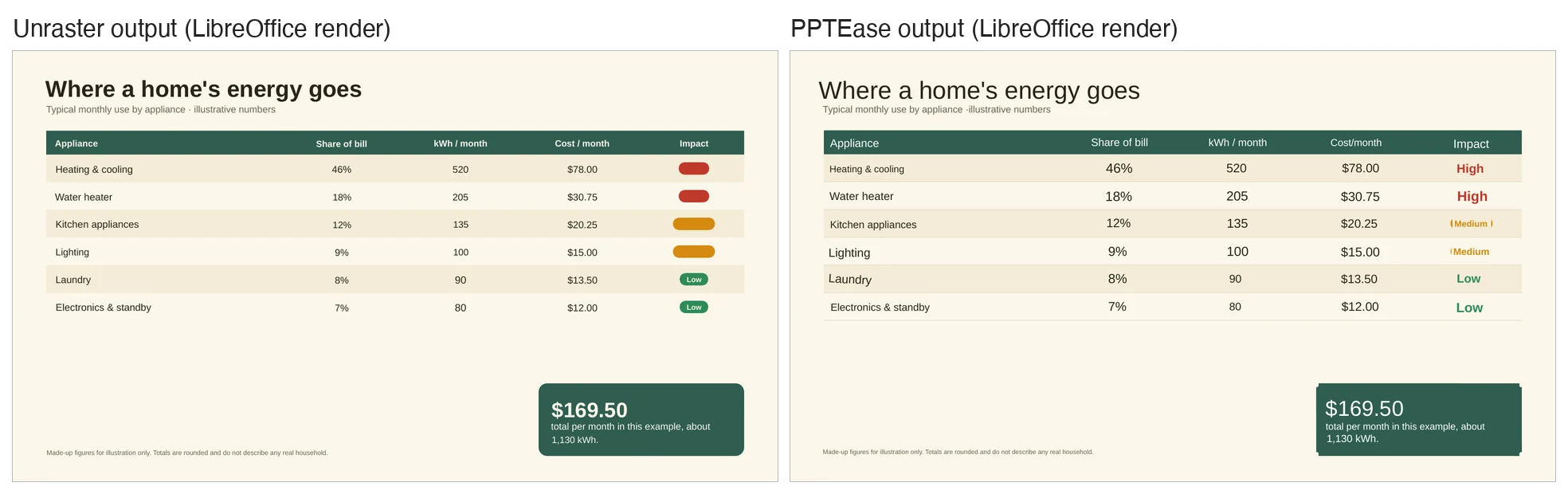
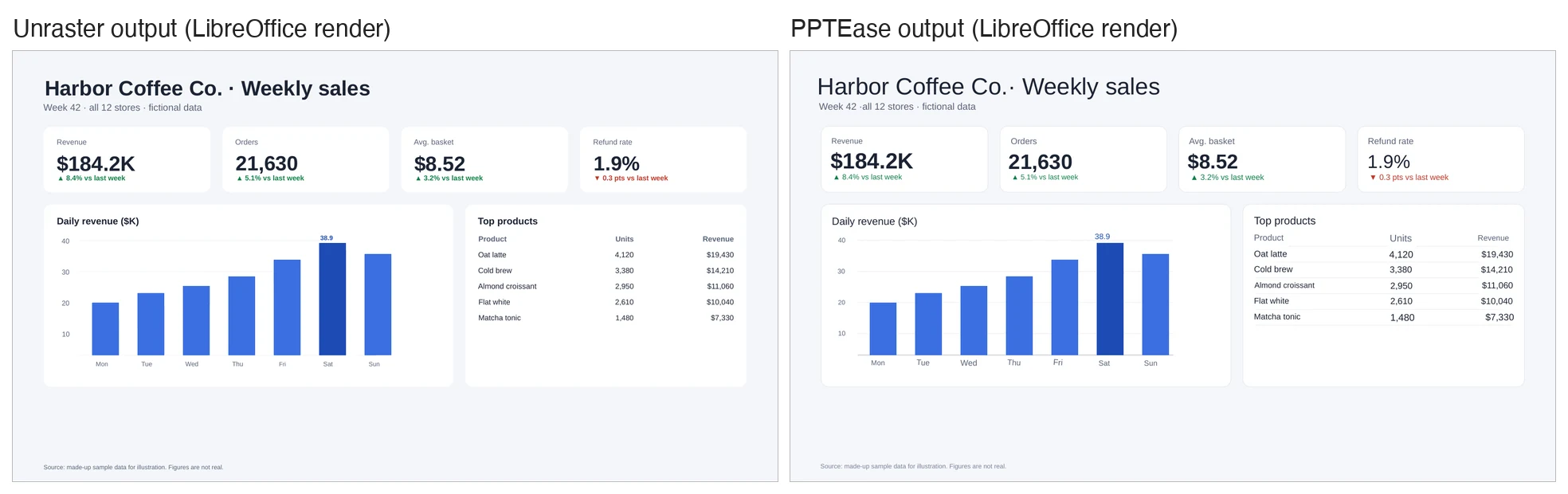
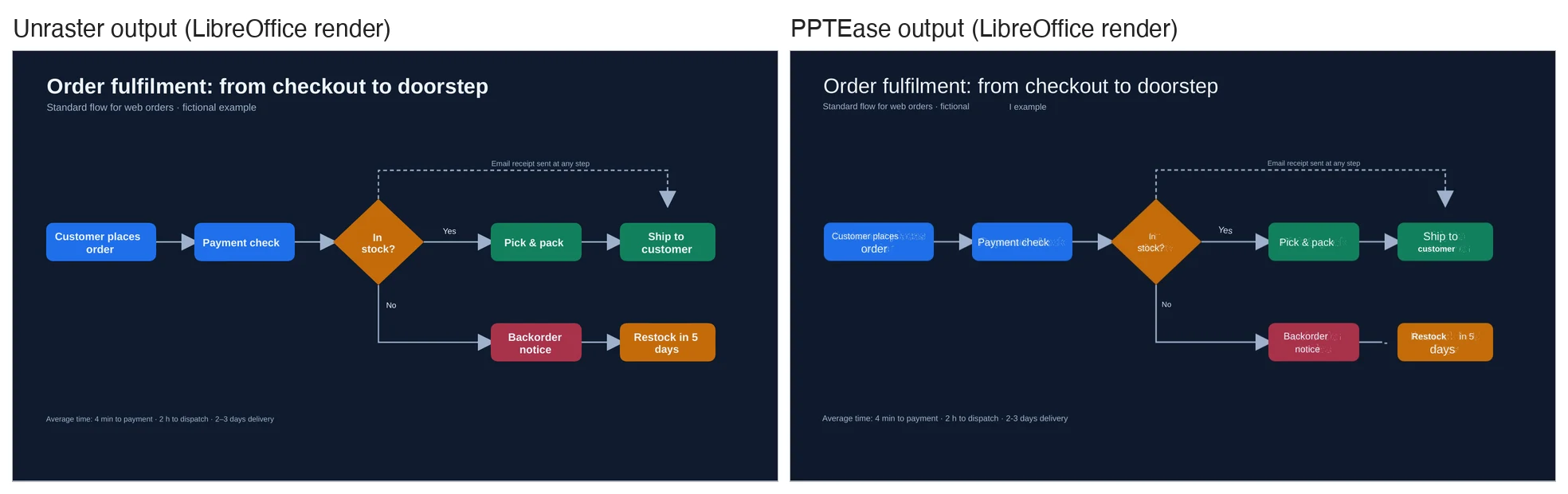
    Slide 1 (dashboard): 47 text boxes and 37 other shapes, no picture; it looks close to the original, but the table row dividers are missing, the 20 and 10 gridlines are gone and the 30 and 40 ones are cut short, and fonts became Arial. Slide 2 (flowchart): 18 text boxes and 77 other shapes, no picture; the layout is close, with two labels sitting slightly left in their boxes, and the arrows are shapes, not connectors. Slide 3 (table infographic): 41 text boxes and 26 other shapes; the serif title became sans-serif, row dividers are missing, and the High and Medium labels came back as tiny text (about 1 to 3.3 pt) in the same colour as their pills, so they cannot be read. Images are LibreOffice renders, not PowerPoint.

  • PPTEaseTested: 3 slides, 1 run each, no account

    With its Pro preview mode on (the mode that adds native shapes and table dividers), each export has one full-slide background picture plus 47, 21 and 41 text boxes (and 7, 0 and 5 other shapes). The three exported files are linked below. Slide 1 looks close: the seven bars are native rectangles and the table dividers and gridlines (in the picture) are kept, though most bold text became regular. On slide 2 the boxes, diamond and arrows stay inside the picture, faint ghost copies of the old lettering show behind some new text, the subtitle’s last word came out as a separate box reading “I example”, and one arrow is cut short; the tool itself flagged “1 text region need OCR review”. On slide 3 every label was visible, but the title became sans-serif and lost its bold, the coloured pills behind the Impact labels are mostly gone, and the table is text boxes over the page picture (its dividers stay in the picture), not a native table. Images are LibreOffice renders, not PowerPoint.

    PPTEase export, slide 1 · slide 2 · slide 3

    Dashboard slide: Unraster output and PPTEase output side by side
    Slide 1. Left: Unraster. Right: PPTEase. Tap or click to open full size.
    Flowchart slide: Unraster output and PPTEase output side by side
    Slide 2. Left: Unraster. Right: PPTEase. Tap or click to open full size.
    Table infographic: Unraster output and PPTEase output side by side
    Slide 3. Left: Unraster. Right: PPTEase. Tap or click to open full size.
  • ReDeckNot tested (sign-in needed to convert)

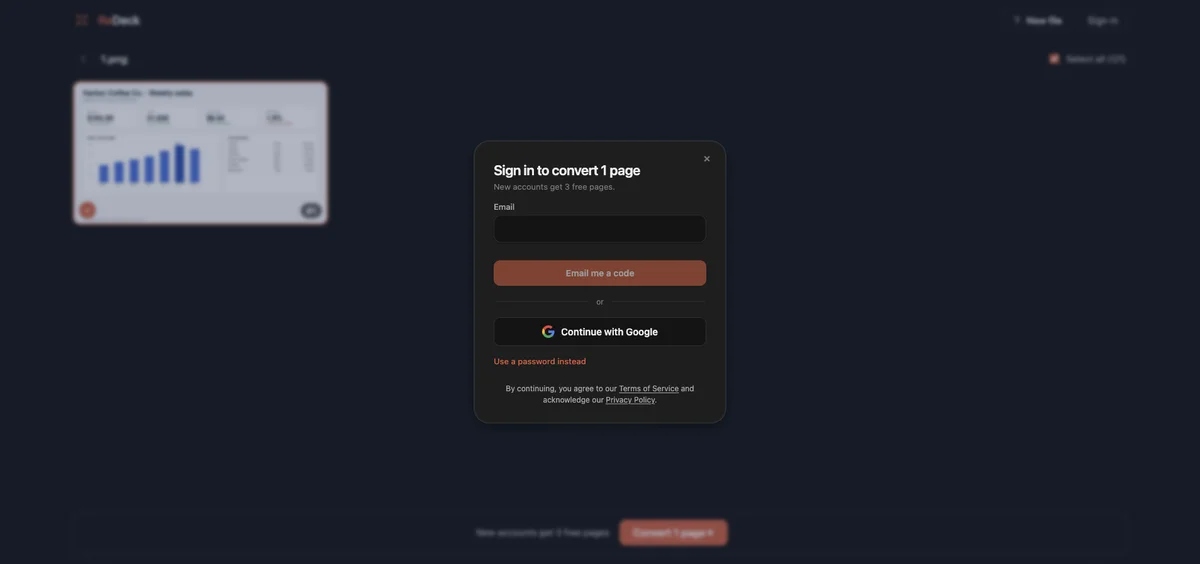
    We uploaded one slide (the dashboard). Uploading and previewing needed no account, but pressing Convert opened a sign-in box (“Sign in to convert 1 page”), so we stopped there. ReDeck gives free pages after a free sign-up; we did not create an account. Everything else about ReDeck comes from its public pages.

    ReDeck sign-in box shown after pressing Convert on a test image
    ReDeck asks you to sign in before converting.
  • Tosea and ReslideNot tested (sign-in needed)

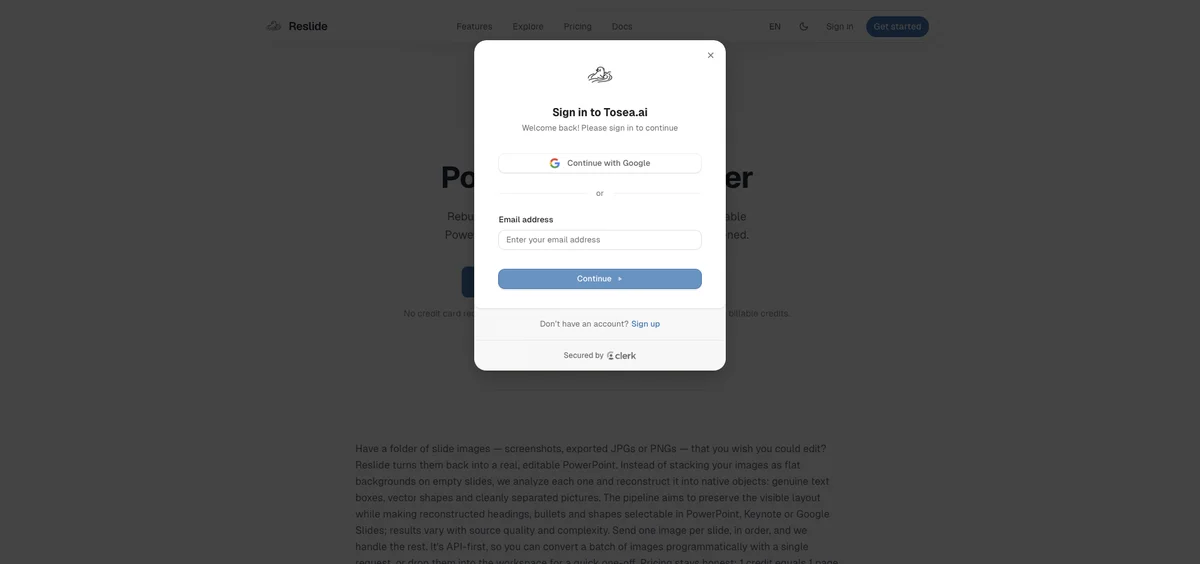
    Tosea’s main product builds decks from prompts and documents, but Tosea also has free image and PDF tools (5 a month in total, shared between them, small watermark) and Reslide, which converts slide images and PDFs and offers 10 free pages. All of them need a sign-in; “Start free” on Reslide opened a sign-in box and we did not create an account, so none of them was tested.

    Reslide sign-in box shown after pressing Start free
    Reslide asks you to sign in to start.
  • CanvaNot tested (Help page only)

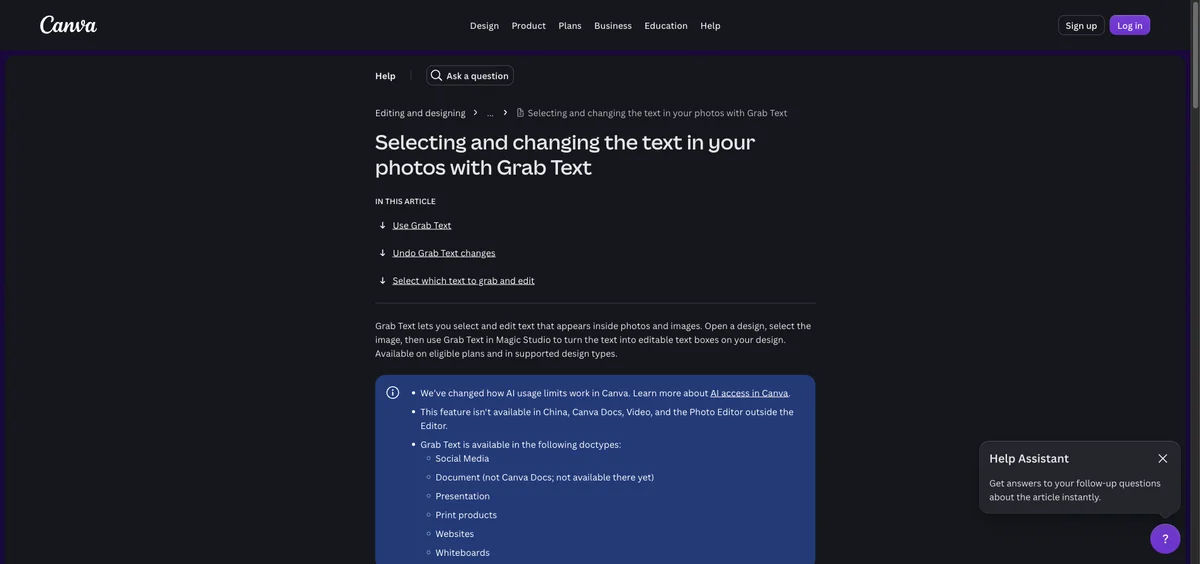
    Grab Text runs inside the Canva editor on eligible plans, and we did not run our slides through it, so we make no claim about its output. The Canva row is based on its Help page, shown here.

    Canva Help page: Selecting and changing the text in your photos with Grab Text
    Canva Help: Grab Text.

How to choose a tool

Start from what you have in hand, not from a ranking.

Watermarked previews are free with any account (up to 3 a day). Unlock the editable file for $2.99 or 2 credits.

  1. Say what you start from

    Images of finished slides: ReDeck, Unraster, PPTEase or Tosea’s image tool or Reslide. A scanned PDF: ReDeck, Unraster or Reslide; Tosea’s PDF tool is for PDFs with a text layer, and PPTEase takes images only. Only an idea or a document: a generator such as Tosea. A deck to lay out and polish: Canva.

  2. Decide what must stay editable

    Text only, or shapes and arrows too? ReDeck and PPTEase can turn some simple shapes into native shapes and leave complex artwork as pictures (in our tests PPTEase made native rectangles of the dashboard bars but left the flowchart shapes in the picture); Unraster rebuilds most graphics as shapes. In the tools we looked at, a chart does not come back as a native chart with data.

  3. Use the free step first

    PPTEase needs no account. ReDeck and Reslide give a few free pages after sign-up. Unraster shows a watermarked preview you can edit before you pay. Try one slide before a whole deck.

  4. Check the result in PowerPoint

    Open the .pptx, click the text, and compare small labels, tables and arrows with your original. Every tool here can miss or change something.

Pay per delivered page.

Several images in one deck: 2 credits a page with a subscription (up to 30 images), 3 without (up to 10), no free preview. A PDF (up to 30 pages): 2 credits per delivered page, no free preview. The $2.99 one-time card is for a single image only.

One PowerPoint Single image

$2.99one-time

  • See a watermarked, editable preview in the page (free with any account)
  • Unlock the file for $2.99 or 2 credits
  • One image at a time; no subscription

A PDF is 2 credits per delivered page; several images are 2 credits a page with a subscription, 3 without.

Credit pack No subscription

$9.90one-time

  • Covers 7 PowerPoint pages or 15 Advanced SVGs, one at a time
  • Batch up to 10 files as a .zip: 3 credits a .pptx, 2 an SVG. A subscription batches at the single-file price (2 and 1).
  • $0.66 per credit
  • Credits last 12 months

Subscription

$19.90/ month

Billed monthly

  • Covers 25 PowerPoint pages or 50 Advanced SVGs every month
  • Batch up to 10 files as a .zip at the single-file price: 2 credits a .pptx, 1 an SVG.
  • $0.40 per credit
  • Credits last 90 days

Prices in USD. Optional AI Clean-up is 1 credit. Cancel or change plans anytime in Credits & billing.

Questions

Anything else? Email us.

What is the best tool to convert an image to editable PowerPoint?

There is no single best tool; it depends on what you start from. For a slide that already exists as an image, ReDeck, Unraster, PPTEase and Tosea’s image tool and Reslide are built for it, and PPTEase needs no account; for a scanned PDF, ReDeck, Unraster and Reslide take them, Tosea’s PDF tool is meant for PDFs with a text layer (its page says scans can only come back as images) and PPTEase takes images only. To write a new deck, a generator such as Tosea fits. To lay out slides yourself, Canva fits. In our test of three slides, Unraster and PPTEase each got text back as editable text boxes and each missed something.

How do I convert a scanned PDF to an editable PPT?

ReDeck and Tosea’s Reslide list PDF as an input (Reslide up to 100 pages per task and explicitly includes scans); Tosea’s own PDF tool is for PDFs with a text layer. Unraster takes one PDF of up to 30 pages on the website and charges 2 credits per delivered page, with no free preview. Scans and phone photos of paper come back worse than clean slide images, so try one page first and check the text against the original.

How do I make a slide image from ChatGPT or Gemini editable?

Save the slide as an image (or a PDF for ReDeck, Unraster or Reslide; PPTEase takes images only) and run it through a converter such as ReDeck, Unraster, Reslide or PPTEase, then retype and move the pieces in PowerPoint. Text usually becomes text boxes; fonts and fine details can change. See our pages for ChatGPT images and Gemini images for details.

What are the free ways to turn an image into editable PowerPoint?

PPTEase is free with no sign-up. ReDeck gives 3 free pages once per account (not guaranteed), and Reslide 10 free pages once. Tosea’s free image and PDF tools share 5 conversions a month after sign-in, with a small watermark. Unraster shows a watermarked editable preview free with any account, up to 3 a day, and unlocking the file is $2.99 or 2 credits. Placing an image on a slide yourself is free, but it stays one flat picture.

Can Canva turn an image into editable PowerPoint?

Grab Text turns text inside an image into editable text boxes in a design, and a design can be downloaded as a PPT file. Grab Text has limits, such as no rotated or arched text, no non-Latin alphabets and no multi-page files. We did not run our slides through Canva, so we cannot say how a whole slide comes out.

How do I edit a NotebookLM slide deck after exporting it?

If the export is a PDF or images, the slides are pictures. ReDeck accepts exports from Gemini Notebook (formerly NotebookLM), and Unraster takes the images or a PDF of up to 30 pages. Either way, check the text and small labels afterwards. Unraster has a page just for NotebookLM slides.

How do the prices compare?

ReDeck: 3 free pages, then $25 for 200 pages or $29 a month for 300. PPTEase: free. Reslide: 10 free pages, then from $19 a month. Tosea: free with a watermark, Pro $9.99 a month billed yearly. Unraster: free watermarked preview with any account (up to 3 a day), then $2.99 or 2 credits for one image, with no subscription needed; a PDF is 2 credits a page with no preview. Canva: free and paid plans, priced per person. These were each tool’s own figures on Nov 13, 2026.

Does Tosea turn images into editable PowerPoint?

Tosea’s main product writes slides from prompts and documents, but it also has free image-to-PPT and PDF-to-PPT tools (5 a month in total, shared between them, with a small watermark, after sign-in) and Reslide for larger jobs. All ask you to sign in, and we did not test them.

Will charts and tables come back as real charts and tables?

Not in the image converters we looked at (Tosea’s generated decks include tables; we did not test it). ReDeck keeps charts and tables as images, PPTEase made the dashboard bars native rectangles in our test (Pro preview mode), with no chart data behind them, and Unraster rebuilds them as shapes and text. If you need a chart with a data sheet, rebuild it from the data in PowerPoint.

What is Unraster weaker at?

Fonts are replaced, so serif titles become sans-serif. Small lettering can come back as shapes, charts have no data behind them, and arrows are shapes, not connectors. Without a subscription, several images cost 3 credits each, and a PDF has no free preview. It is never an exact copy.

How was the test done?

On November 13, 2026 we made three fictional slide images (a dashboard, a flowchart slide and a table infographic). Each went through Unraster once, and through PPTEase once in a browser without an account. For ReDeck and Reslide we stopped at the sign-in box, and we did not run Canva. Exports were rendered with LibreOffice and counted with a script, and nothing was edited by hand.
Try one slide in Unraster and see the preview before you pay.

Or drop images or a PDF anywhere on this page.

Sources, checked Nov 13, 2026: ReDeck · ReDeck pricing · PPTEase · PPTEase image-to-PowerPoint tool · Tosea · Tosea: image to editable PPT · Tosea: PDF to PPT · Reslide by Tosea · Reslide: PDF to PPT · Reslide: image to PPT · Canva Help: Grab Text · Canva: PNG to PPT · Canva pricing.

My files

Pick up where you left off. Saved on this browser.

A fresh canvas awaits.

Images you convert will appear here.

Clearing browser data removes this history.