unraster

Image to editable Google Slides.

Upload a screenshot, a PDF page or an AI-made slide. You get an editable .pptx, not a Google Slides file; open it in Slides and retype.

or drop images or a PDF ·

Free watermarked preview with any account · $2.99 or 2 credits to unlock · Full pricingPricing →

A quarterly review slide, rebuilt as editable text.

A real conversion of a fictional quarterly operations review, generated with an AI image model. The right side is the final .pptx; outlines mark native text boxes and shapes. That .pptx is what you upload to Drive and open in Google Slides.

Compare
Original image
PowerPoint result

Preview rendered from the downloadable PPTX. Outlines show native PowerPoint objects. Some fine lettering may remain as shapes.

How to get an image into Google Slides as editable text

Unraster is not affiliated with Google. It rebuilds your image as a .pptx; Google Slides opens that file, and Save as Google Slides makes a Google Slides copy.

One image becomes one .pptx slide. Upload it to Drive to edit in Google Slides. Watermarked preview free with any account, then $2.99 or 2 credits.

  1. Save the slide as an image

    Use a screenshot, an exported PNG or JPG, a PDF page saved as an image, or an AI-made slide. Keep it under 20 MB; one image becomes one slide.

  2. Preview the watermarked PowerPoint

    Click “Make editable PowerPoint”. You get a watermarked preview of the real PowerPoint, so you can retype text and drag shapes before paying. The preview is not charged (up to 3 a day). Download stays locked until you unlock it for $2.99 or 2 credits.

  3. Unlock the file

    Unlock the file for $2.99 or 2 credits; Download PPTX is free after unlock and your edits are kept. You are charged only after delivery, and a failed conversion is not charged.

  4. Download and put it in Drive

    Download the PowerPoint file and upload it to Google Drive. Unraster does not output Google Slides format, and there is no one-click import into Slides.

  5. Open it in Slides and retype

    Double-click the .pptx in Drive to open it in Google Slides, then use File, Save as Google Slides for an editable copy. Click a text box and replace the words; group each icon before moving it.

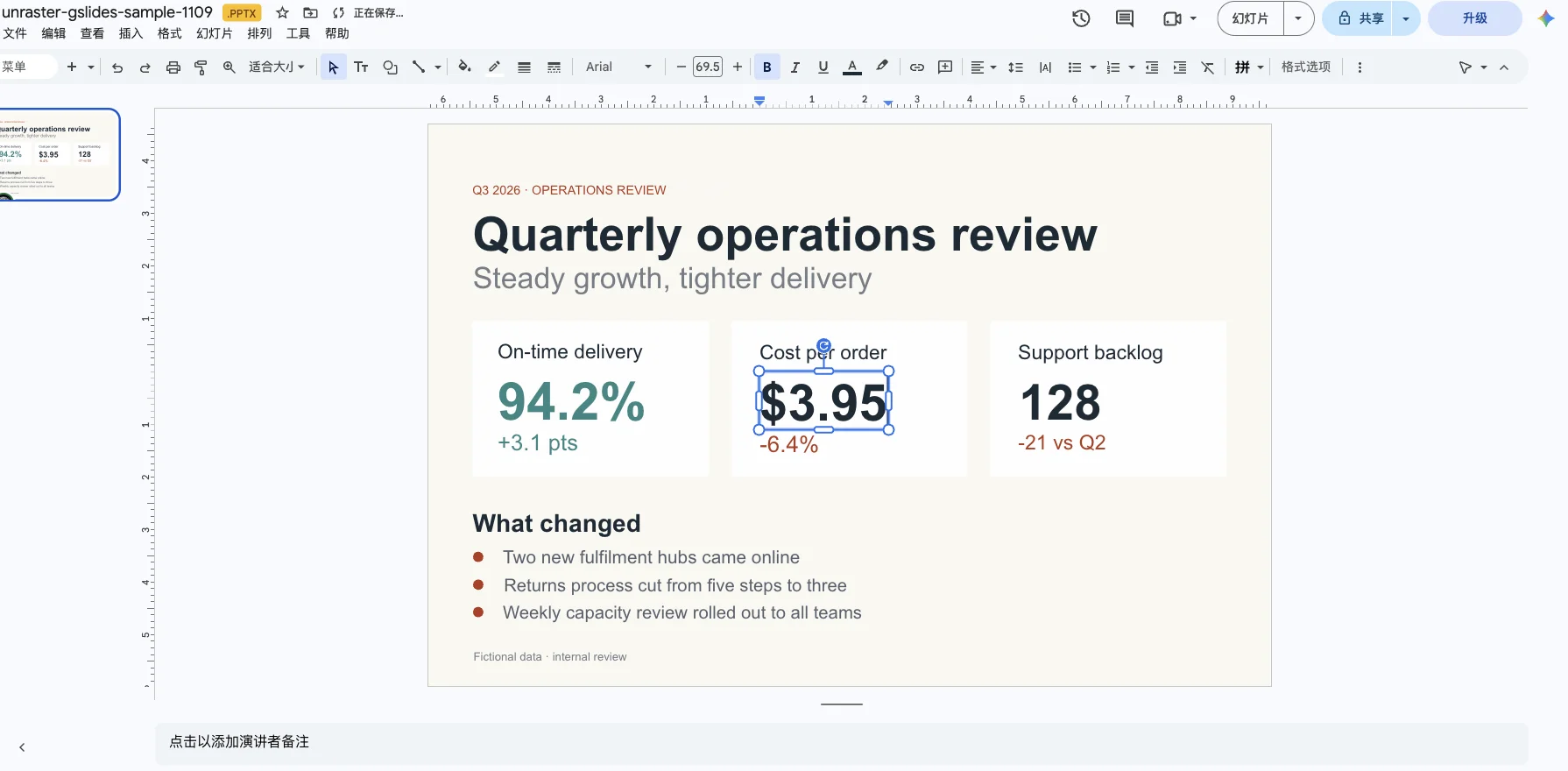
The converted .pptx open in Google Slides with the cost-per-order number selected and retyped as $3.95
The .pptx from this example, opened from Google Drive in Google Slides. A text box was clicked and its number retyped; it stayed a text box, and the font shows as Arial. Language of the Google Slides interface follows your Google account.

Free to start. Pay only for what you keep.

One PowerPoint image is $2.99 or 2 credits. A PDF is 2 credits per delivered page; several images are 2 credits a page with a subscription, 3 without. Basic SVG is free; Advanced SVG is 1 credit. You pay only when you get the file.

One PowerPoint Start here

$2.99one-time

  • See a watermarked, editable preview in the page (free with any account)
  • Unlock the file for $2.99 or 2 credits
  • One image at a time; no subscription

A PDF is 2 credits per delivered page; several images are 2 credits a page with a subscription, 3 without.

Credit pack No subscription

$9.90one-time

  • Covers 7 PowerPoint pages or 15 Advanced SVGs, one at a time
  • Batch up to 10 files as a .zip: 3 credits a .pptx, 2 an SVG. A subscription batches at the single-file price (2 and 1).
  • $0.66 per credit
  • Credits last 12 months

Subscription

$19.90/ month

Billed monthly

  • Covers 25 PowerPoint pages or 50 Advanced SVGs every month
  • Batch up to 10 files as a .zip at the single-file price: 2 credits a .pptx, 1 an SVG.
  • $0.40 per credit
  • Credits last 90 days

Prices in USD. Optional AI Clean-up is 1 credit. Cancel or change plans anytime in Credits & billing.

Questions

Anything else? Email us.

Can I import an image into Google Slides as editable text?

Not with one click. Google Slides inserts a picture as a picture, so the words stay pixels. Unraster rebuilds the image as a .pptx with text boxes and shapes; upload that file to Drive, open it in Google Slides, then use File, Save as Google Slides for a copy you can edit there.

How do I edit text in an image in Google Slides?

You cannot retype the pixels of an inserted image inside Slides. Upload the image to Unraster, download the .pptx, open it in Google Slides and click the text boxes. If you only need to hide a word, a shape can cover it, but that does not make the word editable.

Will the fonts stay the same in Google Slides?

No. Unraster sets the text in a similar installed font, and Google Slides may substitute again if that font is missing. Select the text boxes in Slides and set the font you want; check line breaks afterwards.

What gets lost when the .pptx opens in Google Slides?

Gradients and soft shadows flatten to solid colour, icons arrive as several separate shapes, and lines are not connectors that follow a box. Very small lettering can stay as a shape. The slide keeps the image proportions, so a 3:2 image gives a 3:2 slide, not 16:9.

Can I add or remove table rows and columns?

No. A table in the image is rebuilt as shapes and text boxes, not a native table, so Slides table tools will not add or remove rows. Copy a row of boxes or rebuild the table with Insert, Table.

Does Unraster output Google Slides format?

No. It outputs a standard .pptx. Google Slides opens that file, and File, Save as Google Slides creates a Google Slides copy. Unraster is not affiliated with Google.

What does it cost?

The page shows a watermarked PowerPoint preview, not charged (up to 3 a day). Unlocking any file is $2.99 or 2 credits. No subscription is needed, and a conversion that fails does not take credits.

Turn your slide image into a .pptx you can edit in Google Slides.

Or drop images or a PDF anywhere on this page.

My files

Pick up where you left off. Saved on this browser.

A fresh canvas awaits.

Images you convert will appear here.

Clearing browser data removes this history.